Free MenuTiger Alternative: MenuMate vs MenuTiger (2026)
- Written by
- Ala Baganne
- Published on
- Nov 11, 2026
- Read time
- 5 min
- Category
- Comparisons
Looking for a free MenuTiger alternative? MenuMate and MenuTiger compared on price, order limits, table ordering, payments and menu design.
Short answer: if you want a free QR code menu with ordering from the table and no monthly order limit, MenuMate is a good MenuTiger alternative. MenuMate is free for every restaurant, with no cap on tables or orders, and guests pay you directly. MenuTiger has a free plan too, but it stops at 75 orders a month and one store; after that, plans cost $17, $46 or $119 a month. Pick MenuTiger instead if you need online card payments, a till (POS) or a kitchen display.
This comparison is published by MenuMate. MenuTiger facts come from its pricing page and help center, checked on 11 November 2026. Prices change, so check those pages before you decide.
MenuMate vs MenuTiger at a glance
| Feature | MenuMate | MenuTiger |
|---|---|---|
| Price | Free | Free, then $17, $46 or $119 a month |
| Orders per month | No limit | 75 free, then 500, 2,000 or unlimited |
| Venues | Several in one free account | 1 free, then 2, 5 or unlimited |
| Ordering from the table | Yes, one QR code per table | QR ordering on every plan; full table management on Premium |
| Online payments | No, guests pay you directly | Yes, Stripe and PayPal |
| POS and kitchen display | No | POS add-on; kitchen display from Advanced |
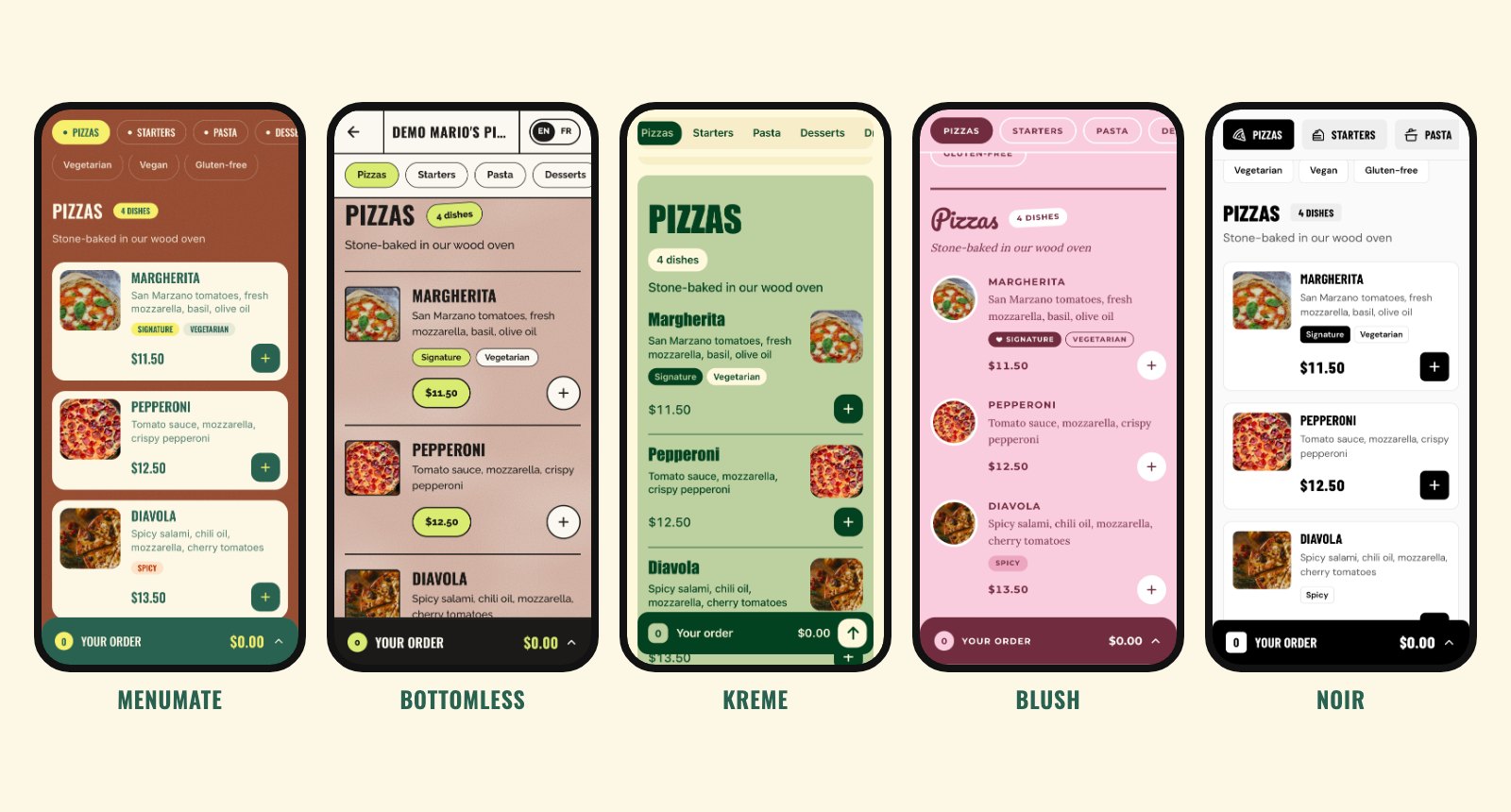
| Menu designs | 5 free themes | Not listed on the pricing page |
| Commission on orders | None | None, says the pricing page |
Where MenuMate is the better pick
- You don't want a monthly bill. Everything in MenuMate is free: the menu editor, the QR codes, ordering from the table, staff logins and several venues. There is no plan to upgrade to.
- You serve more than 75 orders a month. A café that takes 30 orders a day sends about 900 orders a month. On MenuTiger, that is past the free plan (75) and the Regular plan (500), so it lands on Advanced at $46 a month. On MenuMate it stays free.
- Your guests pay in cash or on your card terminal. MenuMate takes the order and leaves payment to you, the way it works today. You need no payment account and pay no card fees to an app. This suits places where most guests pay at the table or at the counter, as in much of Tunisia and France.
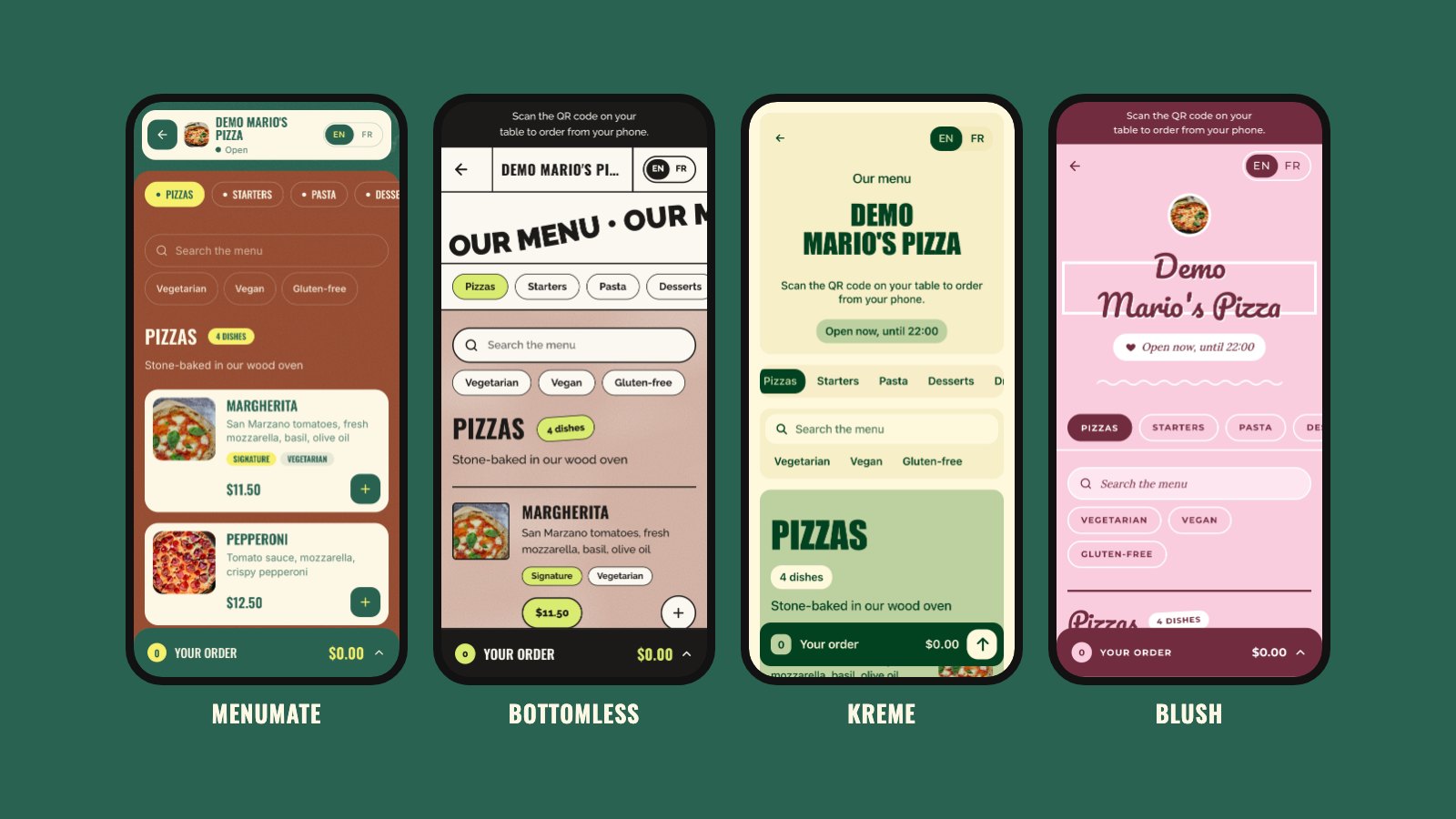
- You want your menu to look like your place. MenuMate has five free designs, from a warm green pizzeria look to Noir, a black and white theme for high-end restaurants. See them all on a phone in our QR code menu design guide.
- You run a team or more than one venue. Invite servers and cashiers with their own logins, and run the menus and orders of several restaurants or cafés from one account, for free.
Where MenuTiger is the better pick
MenuTiger does more than MenuMate in some areas, and it is fair to say so:
- Online payments. Its help center lists PayPal and Stripe, with Apple Pay and Google Pay through Stripe. MenuMate does not take payments at all.
- POS and kitchen display. MenuTiger sells a built-in POS (an add-on on Regular and Advanced, included in Premium) and a kitchen display system from the Advanced plan.
- Table management. Floor plans, merged tables and split bills come with MenuTiger Premium at $119 a month.
- Your own domain. A white label custom domain is part of Premium, or an add-on.
- Menu translation. MenuTiger lists menu translation on its pricing page. MenuMate shows its buttons and cart in English and French, but your dishes show exactly as you write them.
If those features matter more to you than the price, MenuTiger is worth the monthly fee.
What it costs over a year
| Your place | MenuMate | MenuTiger |
|---|---|---|
| Small café, under 75 orders a month | Free | Free |
| Busy café, about 900 orders a month | Free | $46 a month (Advanced), about $552 a year |
MenuTiger also offers 15% off with yearly billing, and its add-ons (POS, printers, custom domain) cost extra on the lower plans.
How to move from MenuTiger to MenuMate
- Create your free MenuMate account and add your restaurant.
- Add your categories and dishes in the menu editor, with prices and photos. There is no import tool, but you can send us your menu and we will help you set it up.
- Pick one of the five designs and check it on the phone preview.
- Print your new table QR codes and replace the old ones. Your old codes still point to MenuTiger, so swap them all on the same day.
- Put your new menu link on your Google Business Profile, Instagram and website.
You can keep both running for a few days while you test MenuMate with your team.
Common questions
Is MenuMate really free?
Yes. There are no plans, no card at sign-up and no commission on orders. You can read more in how much a digital menu costs.
Can guests pay by card through MenuMate?
No. MenuMate takes the order and your team serves it. Guests pay you directly, the way they do today: cash, card terminal or at the counter.
Does MenuMate work outside Tunisia?
Yes. MenuMate is made in Tunisia but works anywhere. Prices show in your own currency, and the menu buttons and cart work in English and French.
What other QR menu apps should I look at?
We compared MenuMate, MenuTiger, Menubly, FineDine and UpMenu in the best QR code menu apps, with facts from each tool's own site.
Want to try it? Open the demo menu on your phone, or make your free digital menu in a few minutes.